

Full-screen chainwheel navigation menu
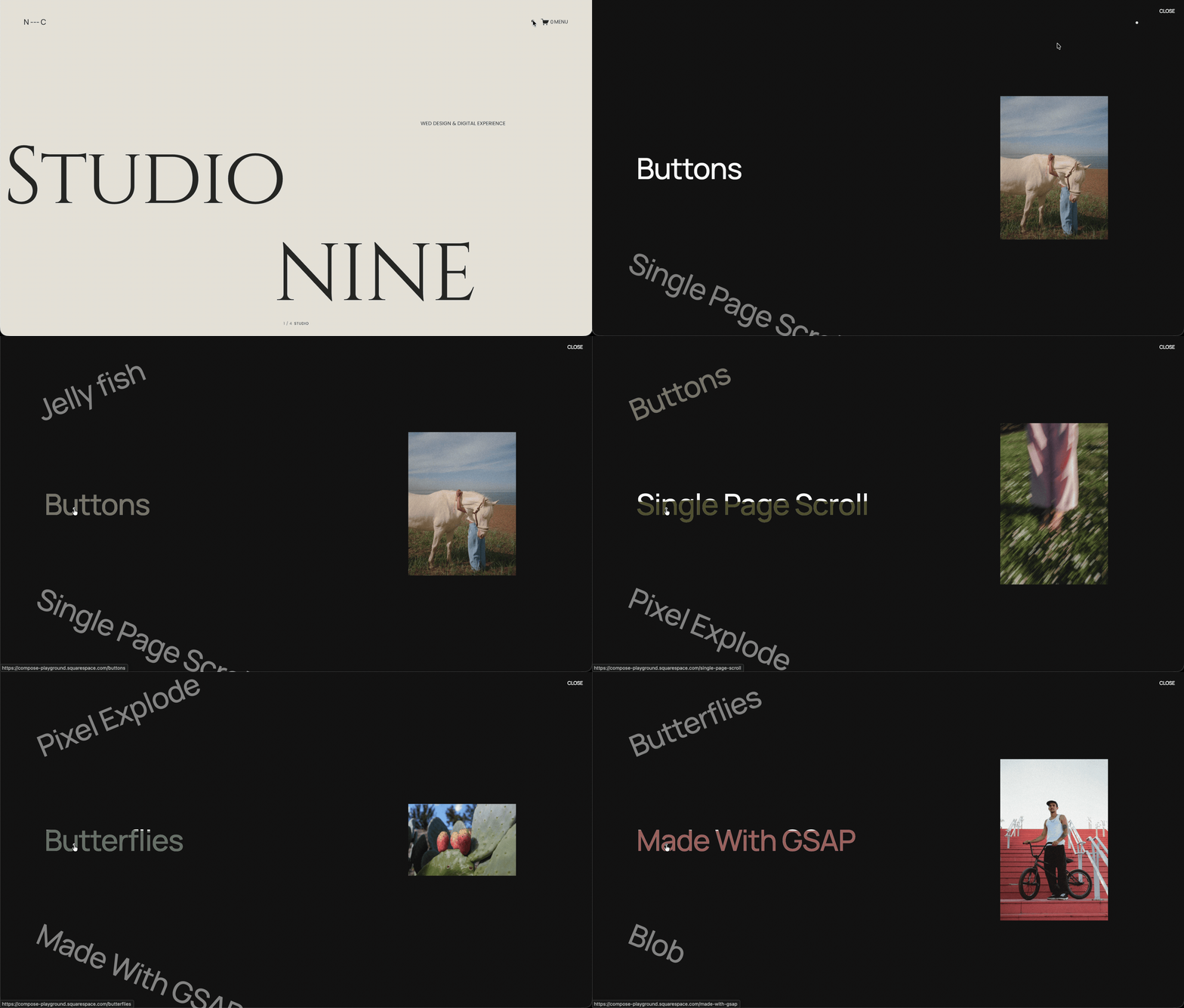
In this video we’re showing a full-screen navigation menu Nirmal built with Compose, inspired by a scrolling text effect that moves like a chain. The menu adds a wavy scrolling motion, ripple-style hover effects, color changes, and image swaps as you move through the navigation. It’s also dynamic, so changing an image or removing a navigation item in Squarespace is reflected in the menu without needing to edit the code.
Setup:
- Add your page links to your site main navigation
- Upload images to the pages “Alternate Social Sharing Image” for pulling into your menu
Build a full-screen navigation menu for Squarespace 7.1 using GSAP, opened by the existing header burger/nav toggle. Read the links out of .header-nav-wrapper (desktop nav list) at runtime, and pull each item's thumbnail from that page's Squarespace social metadata image.Header trigger — hide the desktop nav list (.header-display-desktop .header-nav-list) and replace it with a single uppercase MENU text label. MENU is the burger button, not a proxy next to it — don't synthesise clicks. On desktop Squarespace sets the burger to display:none, so force its container visible, hide the bars, and render MENU as its label so the native click stays trusted. Give the label real layout space so the header can't clip it. Place it on the right of the header — the burger sits in the left slot by default, so push the trigger into the header's right action area (or margin-left:auto) and expose left/right as a variable. Inherit --navigationLinkColor, font family, weight and letter-spacing. Burger keeps working on mobile as-is.Close trigger — inside the panel, render a single uppercase CLOSE text label in the top right (24px in from the top and right edges, position:absolute, z-index above the links). Same treatment as MENU: inherit the heading font family, weight and letter-spacing, ~16px, no border or background, subtle opacity hover (.6 at 0.3s ease). Expose size, text-transform and corner placement as variables. It runs the same close timeline as the burger and Escape, so all three paths share one function — never a second copy of the close logic. Fade it in with the links on open (opacity 0 → 1, tail end of the wipe) and out first on close, before the items compress.Panel — fixed, inset:0, 100vw x 100dvh, background #141414, z-index:99999, overscroll-behavior:contain, touch-action:none. Lock underlying page scroll while open.Layout — position the links along the edge of a large invisible circle, flat and relaxed rather than tight, like a chain wrapped round a sprocket. About 7° between items (angleStep). One progress value drives everything: each item's position on the arc, its own rotation sweeping continuously through roughly ±35°, a color mix from near-black #0D0D0D to full white based on distance from the focal point, opacity that culls items far down the tail, and a blur building to about 5px through the dim tail while the active run stays crisp. Infinite loop — wrap delta to the shortest path, let current run as an unbounded integer.Typography — 92px desktop, clamped with min(92px, 13vw), heading font, transparent-to-white per-item color.Scroll / chain physics — circle radius 2400px, arc inset 140px from the left (22px mobile). angleStep 7° desktop, 5.2° mobile. Per-item rotation = arc angle × 3.2 (rotationFollow). Bright span 2.1 items either side of focus (3.2 on mobile); cull opacity beyond bright span × 1.9; blur ramps from 1.15 items out up to 5px max. Brightness/blur eased with smoothstep. Snapping: tween progress to the target integer over 0.9s, power2.out, overwrite:true. Wheel: accumulate deltaY, advance one item per 55 units, reset the accumulator after 160ms idle. Touch: advance one item per 33px of drag. Velocity lean: raw velocity = Δprogress/Δt × 1000, lean = clamp(raw × 2.6, ±26°), damped toward target at 0.14 per ticker frame, and each item leans harder with distance: × (1 + dist × 0.35).Hover fill — flood in over 2.2s power2.out; drain out over 2.2 × 0.55 = 1.21s power2.inOut. Wavy crest: 16 segments, 2.4 sine cycles across the word, amplitude 3.5% scaled by sin(p·π) so it swells mid-travel and flattens at the ends, phase = p × rippleSpeed(2) × 2π. Fill level travels from 107% (below the glyphs) to −14% (fully clear).Hover fill colour — the flood colour is sampled per item from that item's own thumbnail, not a shared accent. On load, draw each thumbnail into a hidden 1-channel-friendly canvas (small, e.g. 24×24, crossOrigin="anonymous"), average the pixel data while skipping near-black and near-white pixels, and boost saturation slightly so the result reads as a colour and not mud. Store it on the item as a CSS variable (--sk-fsnav-fill) and use it as the fill for that link's wavy clip-path animation. Fall back to white if the image fails or the canvas is tainted. Each link therefore floods in the dominant colour of its own page image.Open / close wipe — open: panel clip-path wipes down over 1.05s power2.inOut, crest = 26 segments, 1.8 sine cycles, amplitude 4.5% × sin(p·π), travelling from −45% to 145% so the wave fully clears both edges; phase shares rippleSpeed(2). Links reveal from y:34 / opacity:0 over 0.6s power4.out, stagger 0.045s, starting at 1.05 × (1 − 0.45) = 0.58s so they land just before the wipe does. Close: crest retreats back up (reverse mode) over 0.75s power2.inOut starting at 0.16s; thumbnail fades over 0.28s power2.in; items go to y:−18 / opacity:0 over 0.3s with 0.022s stagger, power2.in. On link click, navigate after max(300ms, closeDuration × 700).Thumbnail crossfade — 340px wide, positioned 78% 50%. Crossfade 0.75s: incoming from opacity 0 / scale 1.08 / y 26 with power2.out; outgoing to opacity 0 / scale 0.92 / y −26 over 0.75 × 0.85s with power2.inOut. Mobile: 70% width, right-aligned, contain, crossfade opacity capped at 0.34.Mobile — thumbnail 70% width, right-aligned, object-fit:contain so the whole photo shows, dark panel visible on the left. Shift the arc left (mobileArcInset) to clear the image, drop the font to 46px, reduce mobileAngleStep, widen the bright span so more items stay legible on a short screen, and lower the thumbnail's crossfade opacity so text stays readable over it.Note: Not all generations will be identical and may require additional prompts.
